How to lint your desired state: a first look at Microsoft's DSC linter
Lint your desired state before you set it

I've lost count of how many times a configuration failed on me for a reason I could have spotted by reading it. I only found it out when I ran it through DSC's engine.
When I worked with PowerShell DSC, compiling the configuration to a MOF file caught some of these mistakes for me. But Microsoft DSC doesn't have a compile step. You write YAML or JSON and give it to the engine. Simpler, yet it removed the one moment where something read your configuration before it does something to your machine.
I tried to bring that moment back. There's an official branch where you can use the new dsclint executable, which lints configuration documents. In this post, you'll look at how linting works in PowerShell DSC today, what Microsoft DSC gives you without a linter, and what dsclint adds.
[!NOTE]
As mentioned,dsclintis experimental and can be installed from a branch. Its rules, options, and output can change between releases.
Why lint a configuration document?
Linting is static analysis. A linter reads your code or document, compares it against a set of rules, and reports problems without running anything. Nothing changes on the machine, and nothing needs elevated permissions.
That matters for desired state configuration. A configuration document describes changes to a real system. Microsoft DSC already rejects some problems before it calls any resource, such as a document that fails the schema, a resource type that isn't installed, or a dependsOn that points at nothing. Other problems only surface when DSC reaches the resource that has them. A typo in an expression on the fifth resource fails after the first four have already run. Because DSC is idempotent, you can fix the document and run it again. But you've still changed a system with a document that was broken, and in a pipeline that's a failed deployment.
Many of the mistakes that cause those failures are visible in the document itself. An expression that calls a function that doesn't exist. A parameter that's declared but never used, which often means another expression has a typo. A secure parameter with a password typed into its default value. A linter finds these in seconds, before anything is applied.
How linting works in PowerShell DSC
In PowerShell DSC, you author two kinds of things. You write resources, which are PowerShell modules with Get, Set, and Test logic. You also write configurations, which are PowerShell scripts that use the Configuration keyword and compile to MOF files. Each one gets checked in a different way.
For resources, the main tool is PSScriptAnalyzer. Besides its general PowerShell rules, it ships a set of rules for DSC resource authors.
| Rule | Severity | What it checks |
|---|---|---|
| DSCStandardDSCFunctionsInResource | Error | The resource implements Get, Set, and Test |
| DSCUseIdenticalMandatoryParametersForDSC | Error | Key and Required properties in the MOF schema are mandatory parameters in all three functions |
| DSCUseIdenticalParametersForDSC | Error | Get, Set, and Test have identical parameters |
| DSCReturnCorrectTypesForDSCFunctions | Information | Get returns an object, Test returns a Boolean, and Set returns nothing |
| DSCUseVerboseMessageInDSCResource | Information | The resource writes verbose messages |
| DSCDscTestsPresent | Information | The module includes tests |
| DSCDscExamplesPresent | Information | The module includes examples |
You run them like any other PSScriptAnalyzer rule. Point Invoke-ScriptAnalyzer at the folder that holds your resources.
Invoke-ScriptAnalyzer -Path .\source\DSCResources -Recurse
The DSC rules are always enabled. To skip one, exclude it in a PSScriptAnalyzer settings file or add a suppression attribute to the code. A few general rules matter just as much for DSC work, especially AvoidUsingPlainTextForPassword and AvoidUsingConvertToSecureStringWithPlainText.
The DSC Community builds on this. The DscResource.AnalyzerRules module adds custom rules that you load through the CustomRulePath setting. The DscResource.Test module runs the High Quality Resource Module (HQRM) tests with Pester, which cover style, file encoding, examples, and the PSScriptAnalyzer rules. The Sampler build pipeline wires all of this into CI for most community modules. If you remember xDscResourceDesigner and Test-xDscResource, those did a similar job and are now archived.
Configurations are a different story. There's no dedicated linter for them. A configuration is a PowerShell script, so the PowerShell parser catches syntax errors. Compiling the configuration catches more. The compile step fails when a resource isn't available through Import-DscResource, when a mandatory property is missing, or when two resource blocks of the same type share a name. It also refuses to write a plain-text credential to the MOF file unless the configuration data allows it with PSDscAllowPlainTextPassword.
Look at the following configuration. It declares the same File resource twice.
Configuration Example {
    Import-DscResource -ModuleName PSDesiredStateConfiguration

    Node localhost {
        File Website {
            DestinationPath = 'C:\inetpub\wwwwroot\index.html'
            Contents        = 'Hello'
        }

        File Website {
            DestinationPath = 'C:\inetpub\wwwwroot\about.html'
            Contents        = 'About'
        }
    }
}

Example
Running Example doesn't produce a MOF file. The compiler reports a duplicate resource identifier for [File]Website and stops.
This works, but it comes with conditions. Compilation needs PowerShell and every resource module the configuration imports, installed on the machine where you author or build. The errors come back as text, so a pipeline can tell that compilation failed but not why. Since PSDesiredStateConfiguration 2.0, Microsoft only supports configurations for use with Azure machine configuration.
In short, PowerShell DSC has strong tooling for resource code. Checks on configurations are a side effect of compilation, not a tool of their own.
Validation in Microsoft DSC
Microsoft DSC configuration documents are YAML or JSON, and DSC validates them against a JSON schema. That gives you a good editing experience out of the box. In VS Code, associate a YAML document with the enhanced authoring schema by adding a comment to the top of the file.
# yaml-language-server: $schema=https://aka.ms/dsc/schemas/v3/bundled/config/document.vscode.json
With that comment in place, you get IntelliSense, hover help, snippets, and clearer error messages while you type. To get the schema for a single resource's properties, run dsc resource schema.
dsc resource schema --resource Microsoft/OSInfo
A schema only checks structure, though. To a schema, "[parameters('siteNmae')]" is just a string, and a valid one. It can't tell you that no parameter with that name exists. It can't see that two resources depend on each other, or that a secure value flows into a plain output. Until now, you found those problems at runtime, with dsc config test or dsc config set.
Introducing dsclint
dsclint is a separate executable that ships with Microsoft DSC. It reads one or more configuration documents, runs a set of rules against them, and reports what it finds. It never calls a resource's set operation, so it's safe to run anywhere, including on a build agent.
Before you start, make sure you have:
- The dsclint executable from the nightly build (branch
gh-591/main/add-dsc-lint-commnd), extracted to a folder in yourPATH. - The
dscexecutable and the resources your documents use, if you want the rules that check installed resources. Most rules don't need them.
Check that dsclint is available.
dsclint --version
You give dsclint a document in one of three ways. Use --file with a path, and repeat it to lint several documents in one run. Use --file - to read from STDIN. Use --input to pass the document as a string.
Every rule belongs to one of two tiers. Static rules only need the document. Resource rules need the installed resources, so dsclint runs resource discovery first, the same discovery dsc uses. Discovery is on by default. Use --no-discovery to run only the static rules, which is faster and works on a machine with no resources installed. When you lint a document for another machine, use --system-root to point discovery at that operating system root.
The rules fall into seven categories. To see them all with their levels, run dsclint --list-rules.
| Category | What it covers | Example rules |
|---|---|---|
| Document | The shape of the document | duplicate-resource, duplicate-resource-name, empty-resources |
| Expression | Everything inside [...] |
invalid-expression, unknown-function, undefined-parameter |
| Parameter | Declarations and supplied values | no-unused-parameters, secure-parameter-default, missing-parameter-value |
| Dependency | dependsOn and reference() |
unresolved-dependency, circular-dependency, reference-without-depends-on |
| Resource | Installed resource types | unknown-resource-type, property-schema-mismatch, exist-false-unsupported |
| Deprecation | Syntax on its way out | copy-loop-deprecated, security-context-in-metadata, dsc-version-unsatisfied |
| Environment | Portability across system roots | hardcoded-system-path, system-root-unused |
Each rule reports at one of three levels: error, warning, or info. A rule can also be off. A few rules start out off, such as use-parameter-description and missing-require-version. Turn them on when your team wants that strictness. Four checks are fixed and you can't turn them off. They report:
- When the document isn't valid JSON or YAML
- When it fails the schema
- When it isn't a configuration document
- When resource discovery fails.
You control the run with two options. --rule changes the level of one rule, and you can repeat it. --fail-on sets the lowest level that makes dsclint exit with a failure. The default is error, so warnings show up in the report but don't fail the run.
dsclint --file .\web.dsc.config.yaml --rule no-unused-parameters=off --fail-on warning
If you come from PSScriptAnalyzer, this replaces the IncludeRules, ExcludeRules, and Severity settings, and you set it on the command line.
Lint a document
Here's a document with four mistakes in it. Save it as web.dsc.config.yaml.
$schema: https://aka.ms/dsc/schemas/v3/bundled/config/document.json
parameters:
  siteName:
    type: string
    defaultValue: idontlikeai
  logLevel:
    type: string
    defaultValue: info
  adminPassword:
    type: secureString
    defaultValue: P@ssw0rd!
resources:
- name: Site
  type: Microsoft.DSC.Debug/Echo
  properties:
    output: "[parameters('siteNmae')]"
- name: Admin
  type: Microsoft.DSC.Debug/Echo
  dependsOn:
  - "[resourceId('Microsoft.DSC.Debug/Echo', 'Website')]"
  properties:
    output: Admin account configured
The Site resource has a typo in its parameter name. The Admin resource depends on a resource named Website, which doesn't exist. The logLevel parameter isn't used anywhere. And adminPassword is a secure parameter with the password typed into the document.
Run dsclint against the file.
dsclint --file .\web.dsc.config.yaml
In a terminal, dsclint shows each problem in place. You get the file name with line and column, a snippet of the document with the problem marked, and the rule's description as help text. At the end comes a count of errors, warnings, and info messages.
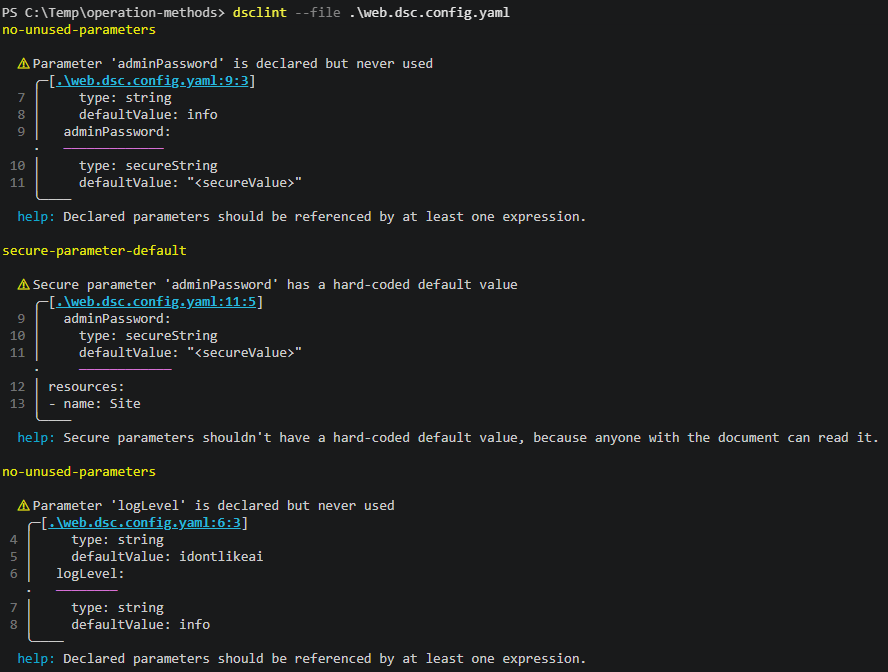
This run reports two errors and four warnings.
| Level | Rule | Line | Message |
|---|---|---|---|
| error | undefined-parameter | 16 | Parameter 'siteNmae' isn't declared in 'parameters' |
| error | unresolved-dependency | 20 | Resource 'Admin' depends on 'Microsoft.DSC.Debug/Echo' named 'Website', which isn't declared |
| warning | no-unused-parameters | 3 | Parameter 'siteName' is declared but never used |
| warning | no-unused-parameters | 6 | Parameter 'logLevel' is declared but never used |
| warning | no-unused-parameters | 9 | Parameter 'adminPassword' is declared but never used |
| warning | secure-parameter-default | 11 | Secure parameter 'adminPassword' has a hard-coded default value |
Notice the warning on line 3. You didn't plant that one. Because of the typo, nothing references siteName, so dsclint reports it as unused. Two diagnostics that point at each other are often one mistake. Fix the error first and the warning goes away.
dsclint exits with code 5 because it reported errors. Every exit code has one meaning, so a script or pipeline can tell what happened.
| Exit code | Meaning |
|---|---|
| 0 | Nothing at or above the --fail-on level |
| 1 | Invalid arguments, such as an unknown rule name or no input |
| 2 | An unexpected DSC error |
| 3 | The result couldn't be serialized |
| 4 | A document or the parameters couldn't be read |
| 5 | A diagnostic at or above the --fail-on level was reported |
Now fix the document. Correct the parameter name and the dependency. Remove logLevel. Remove the default value from adminPassword and use it in the Admin resource as a secure value.
$schema: https://aka.ms/dsc/schemas/v3/bundled/config/document.json
parameters:
  siteName:
    type: string
    defaultValue: contoso
  adminPassword:
    type: secureString
resources:
- name: Site
  type: Microsoft.DSC.Debug/Echo
  properties:
    output: "[parameters('siteName')]"
- name: Admin
  type: Microsoft.DSC.Debug/Echo
  dependsOn:
  - "[resourceId('Microsoft.DSC.Debug/Echo', 'Site')]"
  properties:
    output:
      secureString: "[parameters('adminPassword')]"
Run dsclint again. It reports no errors, no warnings, and no info messages, and it exits with code 0.
Removing the default value has a side effect. adminPassword now needs a value at deployment time. dsclint can check the values you plan to deploy with, too. Create a parameters file named params.json. It uses the same format as dsc config, with the values under a top-level parameters key.
{
  "parameters": {
    "adminPassword": "s3cret",
    "sitename": "idontlikeai"
  }
}
Pass it with --parameters-file.
dsclint --file .\web.dsc.config.yaml --parameters-file .\params.json
dsclint reports an undeclared-parameter-value error. Parameter names are case-sensitive, and the document declares siteName, not sitename. Without the parameters file, this mistake would only show up when you apply the configuration. If you leave adminPassword out of the file, you get missing-parameter-value instead. You can also pass values inline with --parameters. When you use both, the inline values win.
[!NOTE]
With discovery enabled,dsclintcan print trace warnings about the resources it finds on your machine, such as manifests that use an old schema URI. They come from discovery, not from your document. Add--trace-level errorto hide them.
Read the result as data
When you pipe dsclint's output or redirect it to a file, it writes JSON instead of the terminal report. Use --output-format to pick json, pretty-json, or yaml explicitly.
dsclint --file .\web.dsc.config.yaml --output-format pretty-json
Each diagnostic includes the level, the rule, the category, the message, the file, the line and column, and a JSON pointer to the exact spot in the document.
{
  "level": "error",
  "rule": "undefined-parameter",
  "category": "expression",
  "message": "Parameter 'siteNmae' isn't declared in 'parameters'",
  "path": "/resources/0/properties/output",
  "file": "web.dsc.yaml",
  "location": {
    "line": 16,
    "column": 5
  }
}
The result ends with a summary of the counts, a valid flag, and a discovery flag that tells you whether the resource rules ran. That makes the output easy to work with in PowerShell.
$result = dsclint --file .\web.dsc.config.yaml | ConvertFrom-Json
$result.diagnostics | Where-Object level -eq 'error' | Format-Table rule, message
One more detail matters here. dsclint never prints a secret. When it shows a snippet of your document, it replaces secure values with <secureValue>. That includes defaults on secure parameters and values in secureString and secureObject properties. You can paste the report into an issue or a pull request without leaking anything.
Run dsclint in a pipeline
dsclint is most useful when it runs on every change. The exit codes make that easy. Here's a GitHub Actions step that lints every configuration document in the repository and fails the build on any warning. It assumes dsclint is already on the runner's PATH.
- name: Lint DSC configuration documents
  shell: pwsh
  run: |
    $documents = Get-ChildItem -Recurse -Include '*.dsc.yaml', '*.dsc.config.yaml'
    $fileArgs = $documents | ForEach-Object { '--file', $_.FullName }
    dsclint @fileArgs --no-discovery --fail-on warning
The step uses --no-discovery because a build agent usually doesn't have your resources installed. If yours does, drop the option to get the resource rules as well, such as unknown-resource-type and property-schema-mismatch.
Side-by-side comparison
The two approaches lint different things. That's the biggest difference between them.
| PowerShell DSC | Microsoft DSC with dsclint | |
|---|---|---|
| What gets linted | Mostly resource code | Configuration documents |
| Tools | PSScriptAnalyzer, DscResource.Test | dsclint |
| Configuration checks | A side effect of compiling to MOF | Dedicated rules (might change in the future for a plugin model) |
| What you need installed | PowerShell plus every imported resource module | The dsclint executable, plus resources only for the resource rules |
| Expressions | Not applicable, configurations are PowerShell | Parsed and checked |
| Secrets | Rules for plain-text passwords in code | Rules for secure defaults and secure outputs, and redacted reports |
| Rule settings | Settings file and suppression attributes | --rule and --fail-on on the command line |
| Output | PowerShell objects | Terminal report, JSON, or YAML |
| Platforms | Windows first | Windows, Linux, and macOS |
The gap runs in both directions. dsclint lints configuration documents only. It doesn't lint resource manifests yet, and it doesn't look at resource code. If you call PowerShell resources through the PowerShell adapter, keep running PSScriptAnalyzer on those modules. The two tools work well together. PSScriptAnalyzer checks the resources, and dsclint checks the documents that use them.
Where to go next
dsclint is still open for review, so you can expect rule names, default levels, and output to change before it's stable. But you can have influence on the design. There's an open RFC in the GitHub repository where you can leave your feedback.