Remaking SqlServerDSC: Shipping SQL Configuration as Microsoft DSC Resources
A new remake of SqlServerDSC

If there's one DSC resource that survived the dawn of time, it's definitely SqlServerDSC. It has served many organizations to automate SQL Server installations using PowerShell Desired State Configuration (DSC).
But time never stands still. And with time, platforms evolve
That change came with the launch of Microsoft DSC. Whilst it can still run SQL Server DSC resources through its adaptive model, expanding the capabilities means rewriting every DSC resource, at least to class-based DSC resources. Let alone can it take full advantage of the new "command-based" DSC resource model.
It was time for a change.
This is where the OpenDsc project comes in. OpenDsc provides a .NET development kit and a growing collection of native Microsoft DSC resources. These include a new set of resources targeted to configure and automate SQL Server. The difference? Resources are shipped as executables, rather than PowerShell modules.
Same mission, same idempotency, but with a "modern jacket."
The OpenDsc project contains a .NET development kit and, in this case, new DSC resources targeted to configure and automate SQL Server installations. Let's dive into how these resources can help you manage SQL Server in an idempotent way using Microsoft DSC.
A shift in how resources are built
Microsoft DSC does things differently compared to PowerShell DSC. You don't have PowerShell modules anymore, no functions, or a runtime that executes the resources through PowerShell.
No...
It simply introduces a basic, but powerful idea: a DSC resource as executable with a well-defined (JSON) contract. This resource doesn't have to be written in PowerShell (even though it can), but you can use .NET, Rust, Bash, or whatever you like. As long as it complies with that contract.
Now I could talk for hours about this, but we're here for SQL Server. OpenDsc.SqlServer delivers these resources in this jacket. Each resource is an executable with this contact. It has the same domain knowledge and automation goals as SqlServerDsc. But the difference is that it's packaged as a first-class citizen for Microsoft DSC's engine.
The following resources are already available to be tested out:
OpenDsc.SqlServer/Login- Manage SQL Server loginsOpenDsc.SqlServer/Database- Manage SQL Server databasesOpenDsc.SqlServer/DatabaseRole- Manage SQL Server database rolesOpenDsc.SqlServer/ServerRole- Manage SQL Server server rolesOpenDsc.SqlServer/DatabasePermission- Manage SQL Server database permissionsOpenDsc.SqlServer/ServerPermission- Manage SQL Server server permissionsOpenDsc.SqlServer/ObjectPermission- Manage SQL Server object permissions- And more to come...
That's the theory, but how do you actually get started? That's where it's going to be different compared to PowerShell. So let's move from concept to something tangible.
Installing and using OpenDsc.SqlServer
Normally, you would open your PowerShell module and type in: Install-Module or Install-PSResource. OpenDsc.SqlServer resources are distributed as versioned binaries through GitHub releases, or the latest versions can be grabbed from GitHub actions. In this case, there hasn't been an official release (yet) for the resources, so we can download them from the actions job.
What you would do is download the .zip file, or the format that is distributed for the operating systems (yes, resources can be cross-platform), extract it to your PATH environment variable, and you should be set to go. The step below to do so:
- Go to the OpenDsc repository on GitHub
- Locate the Actions tab and in the list of workflows, select CI
- In the filters, select the main branch and pick the latest run
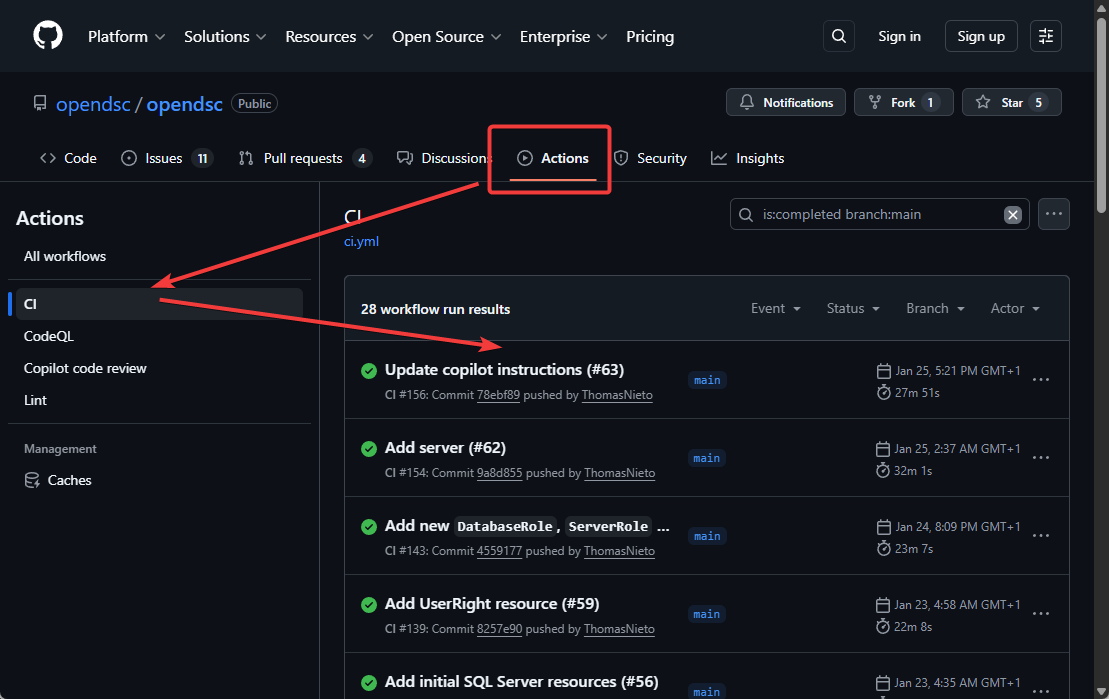
- Download the artifact for your operating system
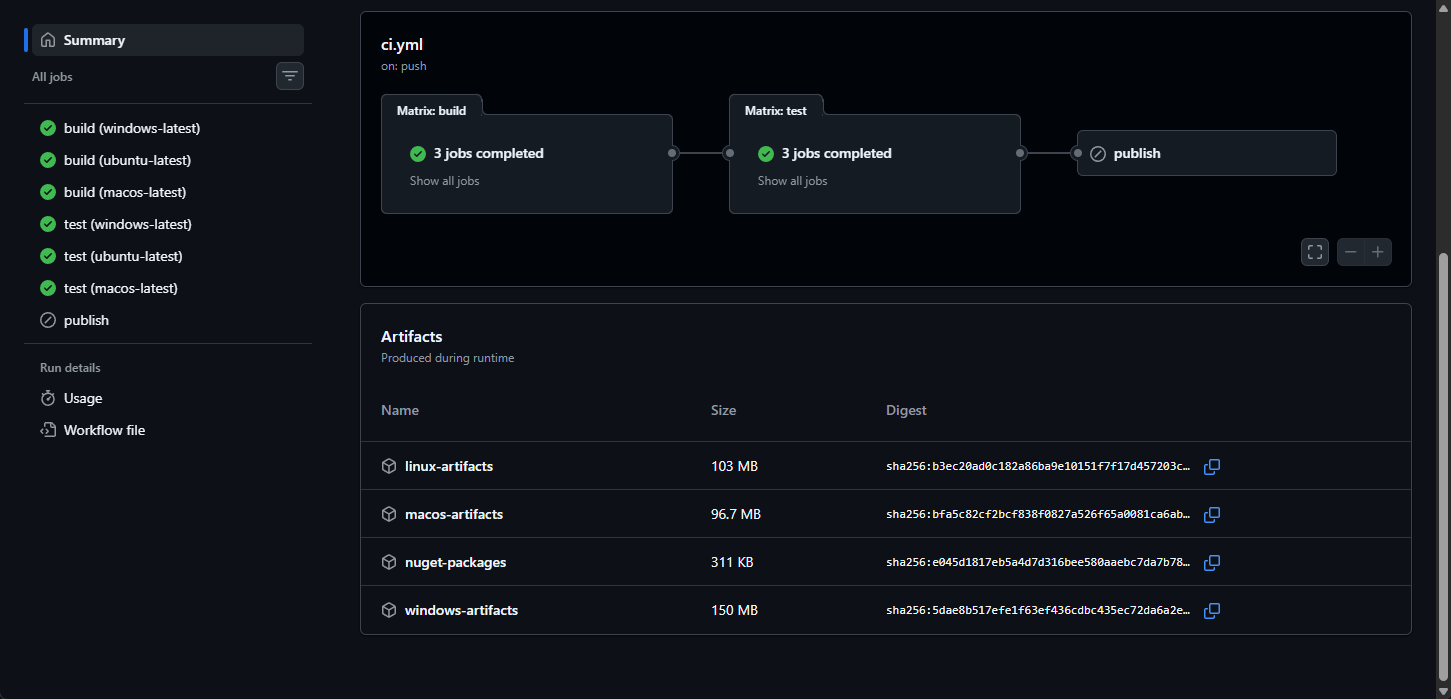
- Extract the
.zipfile and add it to thePATHenvironment variable - Run
dsc resource listin your shell to validate if the resources are found
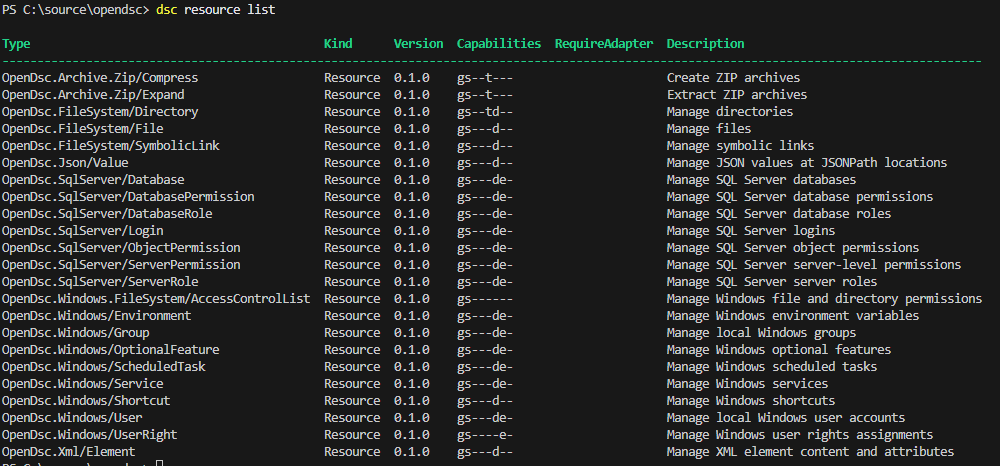
Discovering resources with Microsoft DSC
Once the executables are extracted and part of your PATH variable, Microsoft DSC detects them automatically. No registration is needed or import required. If the executable exists and the resource manifest is located, it is participating.
Each of the resources you saw in Figure 3 is part of one executable. It's all packaged into one. Run the following command in a PowerShell terminal session to see this:
$typeName = 'OpenDsc.SqlServer/Login'
(Get-Content (dsc resource list |
    ConvertFrom-Json |
    Where-Object -Property type -eq $typeName).path |
    ConvertFrom-Json).resources |
    Where-Object -Property type -eq $typeName
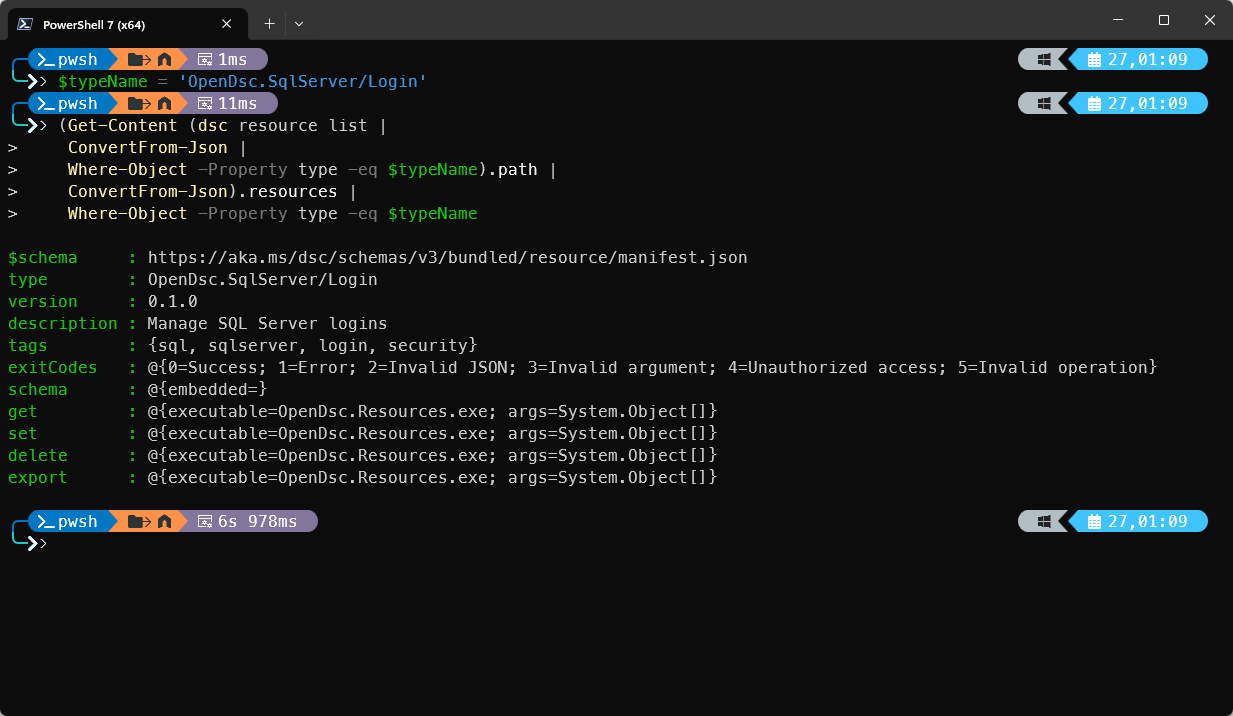
Okay, you know the DSC resource is an executable now. But how do we know the available properties? Can we run Get-DscResource? Not really, we're using a CLI, remember?
To see the available properties, run the following command: dsc resource schema --resource OpenDsc.SqlServer/Login
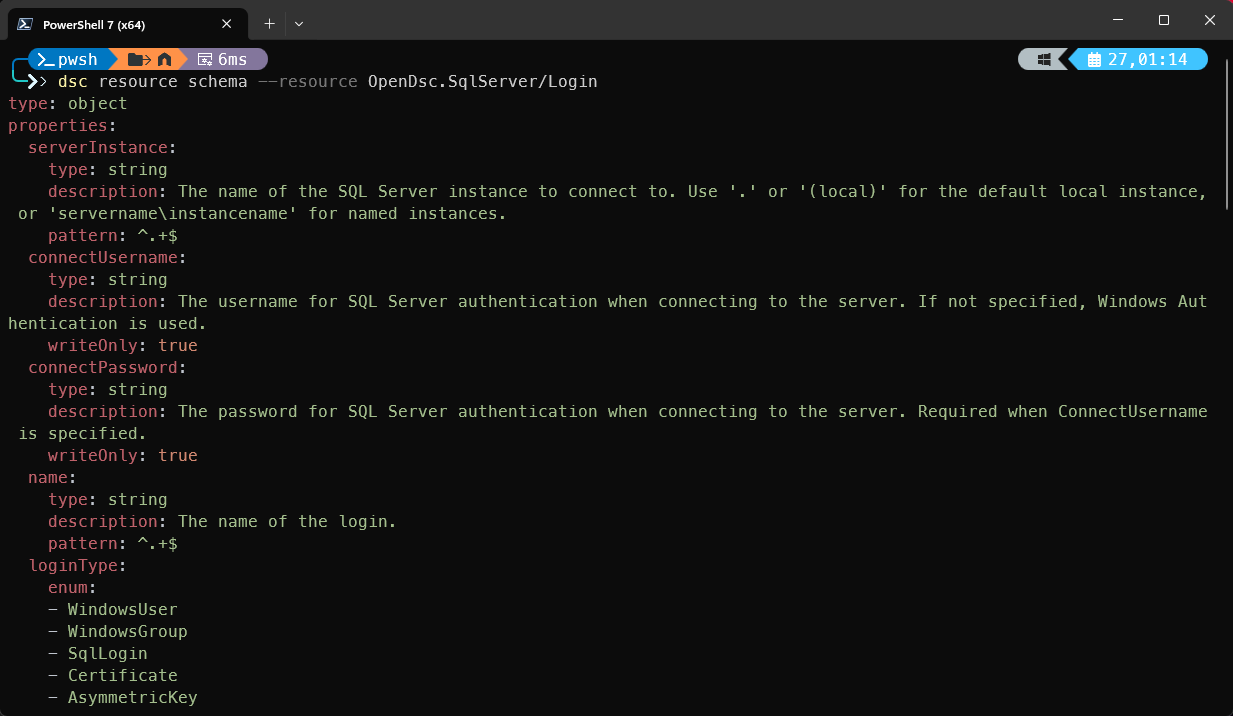
The image is reduced, but if you've scrolled down, you've noticed the two required properties: serverInstance and name. To create an SQL Server login using this resource, you can create a configuration document:
# sqlLogin.dsc.config.yaml
$schema: https://aka.ms/dsc/schemas/v3/bundled/config/document.json
resources:
- name: Configure parallelism settings
  type: OpenDsc.SqlServer/Login
  properties:
    serverInstance: localhost
    name: myLogin
And that's basically it. Then you would run dsc config set --file sqlLogin.dsc.config.yaml and the login will be created.
Putting it all together
At this point, you know how to discover the resources and how to get the available properties. Now you can create a whole flow that starts from a database to setting secure permissions. Let's put it together:
# database.dsc.config.yaml
$schema: https://aka.ms/dsc/schemas/v3/bundled/config/document.json

# Configuration metadata
metadata:
  description: SQL Server database configuration
  author: Gijs Reijn
  version: 1.0.0

# Parameters for reusable values
parameters:
  serverInstance:
    type: string
    defaultValue: "."
    description: SQL Server instance name (e.g., '.', 'localhost', 'server\instance')

# 1. Create Database (first, as foundation)
  - name: Create application database
    type: OpenDsc.SqlServer/Database
    properties:
      serverInstance: "[parameters('serverInstance')]"
      name: AppDatabase
      collation: SQL_Latin1_General_CP1_CI_AS
      recoveryModel: Full
      owner: sa

  # 2. Create SQL Server Login
  - name: Create application login
    type: OpenDsc.SqlServer/Login
    properties:
      serverInstance: "[parameters('serverInstance')]"
      name: AppUser
      loginType: SqlLogin
      password: "SecureP@ssw0rd123!"
      defaultDatabase: AppDatabase
      disabled: false
    dependsOn:
      - "[resourceId('OpenDsc.SqlServer/Database', 'Create application database')]"

  # 3. Create Windows Authentication Login
  - name: Create Windows login
    type: OpenDsc.SqlServer/Login
    properties:
      serverInstance: "[parameters('serverInstance')]"
      name: "BUILTIN\\Administrators"
      loginType: WindowsGroup
      defaultDatabase: master

  # 4. Create custom database role (without members for now)
  - name: Create application database role
    type: OpenDsc.SqlServer/DatabaseRole
    properties:
      serverInstance: "[parameters('serverInstance')]"
      databaseName: AppDatabase
      name: AppRole
      owner: dbo
    dependsOn:
      - "[resourceId('OpenDsc.SqlServer/Database', 'Create application database')]"

  # 5. Create server role
  - name: Create monitoring server role
    type: OpenDsc.SqlServer/ServerRole
    properties:
      serverInstance: "[parameters('serverInstance')]"
      name: MonitoringRole
      owner: sa
      members:
        - AppUser
    dependsOn:
      - "[resourceId('OpenDsc.SqlServer/Login', 'Create application login')]"

  # 6. Grant server permission
  - name: Grant view server state permission
    type: OpenDsc.SqlServer/ServerPermission
    properties:
      serverInstance: "[parameters('serverInstance')]"
      principal: AppUser
      permission: ViewServerState
      state: Grant
    dependsOn:
      - "[resourceId('OpenDsc.SqlServer/Login', 'Create application login')]"

  # 7. Grant connect SQL permission
  - name: Grant connect SQL permission
    type: OpenDsc.SqlServer/ServerPermission
    properties:
      serverInstance: "[parameters('serverInstance')]"
      principal: AppUser
      permission: ConnectSql
      state: Grant
    dependsOn:
      - "[resourceId('OpenDsc.SqlServer/Login', 'Create application login')]"
To apply the configuration document to your instance, run dsc config set --file database.dsc.config.yaml.
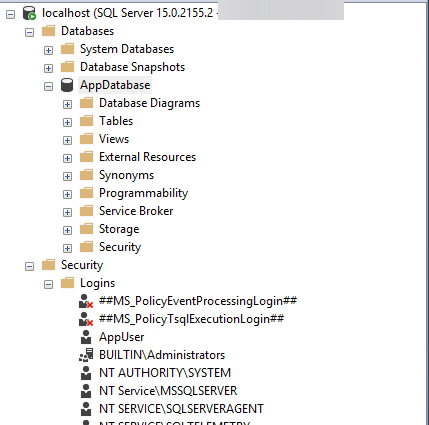
If you want to specify a different instance, use the --parameters option like this:
$parameters = @{
  parameters = @{
    serverInstance = '<yourInstance>'
  }
} | ConvertTo-Json -Depth 5 -Compress
dsc config --parameters $parameters --file databricks.dsc.config.yaml
And there you have it, a configured database with roles, logins, and permissions!
Summary
Let's keep things clear. SqlServerDsc didn't disappear, and it will exist as it is today. The OpenDsc project is not there to replace it, and if you're still looking for LCM functionality for PowerShell DSC, I would stick with where you are. Microsoft hasn't officially released an orchestration tool for Microsoft DSC.
But...
This is a "new jacket" for configuring SQL Server, and as seen from the performance, it's pretty quick! Once you get in the flow (and somewhere in the future when an LCM comes), you don't want to go back.